
Mouse Trap: Hasbro Board Game
Marmalade Game StudioBoard
4.6301.00 Reviews
- Version
- 1.0.12
- Installs
- 100.00K
- Age Rating
- Everyone
Screenshots
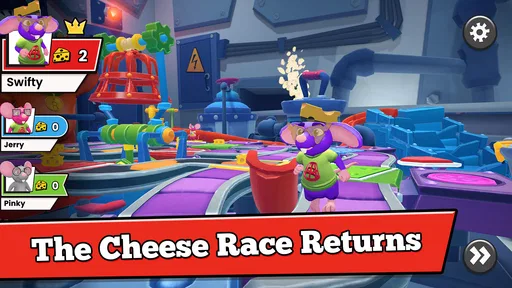
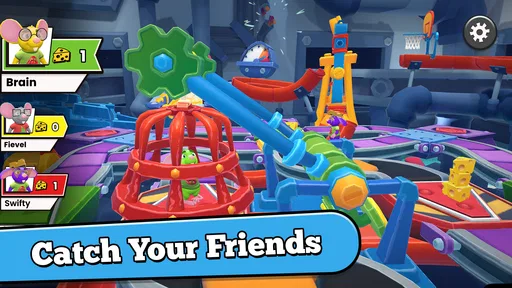

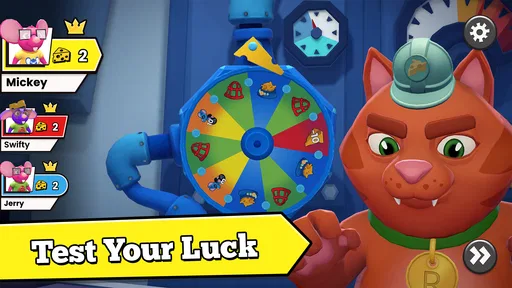
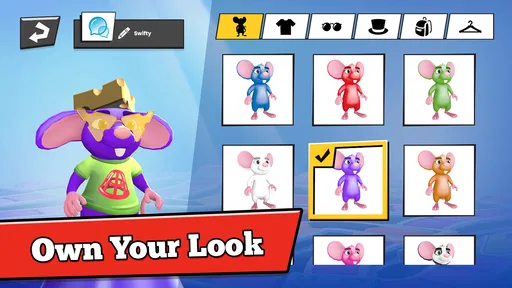

Our Review of Mouse Trap: Hasbro Board Game
 Analysis by Appyee
I like board games that give everyone an easy way into the action, and a familiar setup can make that first step feel less daunting. Mouse Trap: Hasbro Board Game brings the recognizable tabletop idea to phones and tablets, with the moving pieces and trap action handled on-screen. My first impression is that it is best approached as a light, social board game: the pleasure comes from following the chain of play and sharing the suspense, rather than mastering a complicated strategy system.
What to expect from this digital board game
This is a paid board game from Marmalade Game Studio, priced at $2.99, with optional in-app purchases ranging from $0.99 to $9.99 per item. It is rated Everyone, and its current version is 1.0.12. The game has a 4.5 average from around two thousand ratings, and has passed one hundred thousand installs. Those figures suggest an established audience, but they do not tell you whether its particular style will suit your group; the key question is whether you enjoy taking turns around a playful, familiar board.
The mobile format changes the practical feel of the game. There are no small pieces to sort out, and the app handles the board’s activity for you. That makes it a convenient choice when you want a quick game without unpacking a physical set, or when the people you want to play with are not sitting around the same table. At the same time, a screen cannot quite reproduce the hands-on anticipation of watching a real contraption come together. If building and triggering the physical trap is the main memory you want to revisit, that difference matters.
Getting started without overthinking it
When you first launch the Mouse Trap: Hasbro Board Game app, you're greeted with that iconic, colorful board. The app developers have done a stellar job in maintaining the essence of the original game while adding a sprinkle of digital flair. The setup process is super intuitive, making it easy for both seasoned players and newcomers alike. No more fumbling with tiny plastic pieces; everything is at the tip of your fingers.
For a first session, I would resist the urge to rush through every prompt just to reach a match. Give yourself a moment to see how the board presents the turn and where the next action appears. That small pause helps new players distinguish between choosing a move and watching the game resolve it. If you are introducing the game to someone who has never played the tabletop version, let them follow the on-screen flow rather than explaining every possible outcome in advance. The clearest first lesson is simply to take a turn and see what the board does.
Finding the first satisfying moment
What stands out immediately is the attention to detail. The app isn't just a digital replica; it’s a trip down memory lane with enhancements. The animations are smooth, and the sound effects add to the overall experience, making you feel as if you're back in your childhood living room.
The best first success is not necessarily winning; it is understanding how an ordinary turn connects to the trap-filled spectacle that gives this game its identity. Watch the animation through once before tapping ahead, especially if you are learning alongside someone else. Seeing the sequence play out makes later turns easier to follow, and it gives the group a shared moment to react to. I also find that this is where the app works particularly well for mixed-age company: younger players can enjoy the visual payoff while adults help keep track of whose turn it is.
The Setup: Nostalgia Meets Convenience
I’d use this section to set expectations for a first session: the appeal is a familiar, light board-game routine made easier to start on a phone or tablet, not a deep strategy challenge. The main adjustment is trading the feel of physical pieces for a screen-led game, which makes the next step—getting comfortable with the setup—worth taking at an easy pace.
Gameplay: Simple Yet Engaging
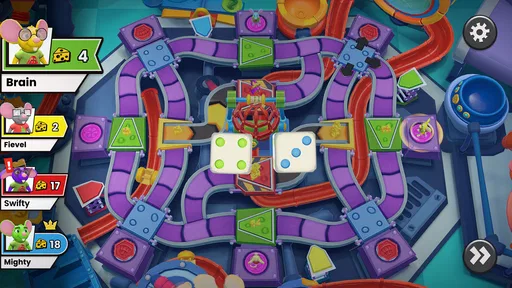
The core mechanics of the game remain unchanged. You roll the dice, move your mouse, and aim to trap your opponents. Simple, right? But don't let that simplicity fool you. The digital version introduces challenges that keep the gameplay fresh and engaging. The AI opponents are surprisingly adept, providing a good challenge without feeling like you're up against a supercomputer.
One of the delightful aspects is the multiplayer mode. You can connect with friends or random players online, bringing a social element that board game nights often offer. I found myself getting competitive, strategizing my moves to outsmart both friends and the AI. It’s these moments that make the app more than just a game; it’s an experience.
Common sticking points, and how to avoid them
The rules sound simple, but the physical spectacle can make it easy to focus on the animation and miss the reason a turn mattered. When playing with newcomers, I would say the immediate goal aloud before the turn begins, then let the game show the result. That keeps the group involved without turning a casual session into a rules lecture. It is also worth remembering that a lively animation is part of the presentation, not a promise that every turn changes the board in a dramatic way.
There is a trade-off in the digital convenience. Automated movement keeps play tidy, but it also means you are trusting the interface to communicate what happened. If a player is unsure why a move worked out as it did, pause on the board and talk through the visible result rather than tapping onward. This is especially useful when children and adults are learning together, since a quick explanation can prevent one confused turn from slowing the whole game.
Online play is appealing when friends are not nearby, while AI opponents make it possible to try a session without coordinating schedules. Those options serve different moods: playing with people you know gives the game a more personal, teasing rhythm, whereas a computer opponent is the practical choice for a short solo practice. If you are looking for a deep, competitive board-game ladder or a strategy game where careful planning dominates every turn, this lighter, animation-led experience may not be the right fit.
Visuals and Sound: A Feast for the Senses
The app shines in its visual presentation. The board is vibrant, and the traps are animated in delightful detail. It’s like watching a mini Rube Goldberg machine come to life each time a trap is set off. The colors pop, and the overall aesthetic is pleasing, ensuring that each session is as enjoyable as the last.
The sound design complements the visuals perfectly. From the clatter of dice to the satisfying click of a successful trap, the audio enhances the immersive quality of the game. It's these little touches that elevate the app from being just another board game adaptation to a full-fledged digital experience.
Who will enjoy it, and when another choice makes sense
I can see this working best for someone who wants a recognizable game to fill a relaxed evening, a short break, or a visit with family. It asks less of a first-time player than many heavier board games: there is no long strategy lesson before the group can begin. The animated trap also gives younger players something immediate to watch, while familiar rules help adults join in without needing to learn a completely new theme.
For example, if a family has a little time after dinner but does not want to clear a table and lay out a physical game, the app offers a ready-to-start alternative. A parent can help a child follow the turn, then let the child anticipate what the next move might trigger. That works best when everyone is happy to share one device or arrange a multiplayer session in a way that suits them. If you prefer a tactile tabletop evening, or want a game built around long-term planning and varied strategic choices, a physical board game or a more demanding digital board title will likely be more satisfying.
The choice between this and other board-game apps comes down to what you want from the category. Many digital board games focus on abstract strategy, wordplay, or recreating a familiar tabletop routine with minimal spectacle. Mouse Trap’s particular appeal is the visual chain of action and its playful nostalgia. That also limits its reach: if the trap animation does not interest you, the core turn-taking may feel too simple to carry repeated sessions. I would choose it for a light, shared laugh, not as a substitute for every kind of board game.
Ease of Use: A Smooth Ride
One thing that can make or break an app is its usability. Fortunately, Mouse Trap: Hasbro Board Game nails this aspect. The interface is user-friendly, with intuitive controls that make navigation a breeze. Whether you're setting traps or strategizing your next move, everything is accessible and easy to understand.
The app also includes a helpful tutorial for newcomers, ensuring that everyone is on the same page when it comes to gameplay mechanics. This is particularly useful for those who might be unfamiliar with the original board game.
A practical tip for a first-time player is to treat the tutorial as a warm-up, then play a full session at an unhurried pace. That gives you time to connect the basic instructions with what appears on the board, rather than trying to memorize rules in isolation. If you already know the physical game, the tutorial can still help you adjust to the screen-based flow. The interface may be straightforward, but taking a moment to learn where the game communicates each action makes the first match feel more comfortable.
Deciding whether the purchase fits your habits
Because this is a paid game with optional purchases, I would decide first whether you are buying it for occasional family play or for regular sessions with friends. The initial price is clear, but the existence of additional purchases is worth keeping in mind if you prefer games with no optional spending at all. I would not treat those purchases as necessary to enjoy a first look; start with the base game and see whether its style holds your attention before considering anything extra.
It is also a better fit for players comfortable with a mobile board game than for someone who expects the app to reproduce every tactile part of the boxed version. The phone or tablet handles the pieces and animations, which is convenient, but the group still needs to bring the conversation and patience that make a board game social. For a quick solo session, an AI opponent is useful; for a memorable family round, the people sharing the game matter at least as much as the screen.
The Verdict: A Must-Try for Fans and Newcomers Alike
Overall, Mouse Trap: Hasbro Board Game successfully bridges the gap between nostalgic board game fun and modern digital convenience. It retains the charm of the original while adding layers that make it suitable for today's gaming landscape. Whether you're a lifelong fan or someone new to the game, this app offers a delightful escape into a world of strategy, fun, and a bit of friendly competition.
So, if you're looking for a game that’s easy to pick up yet hard to put down, this might just be the perfect addition to your mobile gaming repertoire. Grab your friends, set those traps, and let the fun begin!
Verdict
Strengths of Mouse Trap: Hasbro Board Game
- Faithful digital adaptation of the classic board game.
- Multiplayer mode enhances fun with friends.
- Vibrant graphics capture the original charm.
- Intuitive controls ensure smooth gameplay.
- Regular updates keep the game fresh.
Limitations of Mouse Trap: Hasbro Board Game
- Requires stable internet for multiplayer mode.
- In-app purchases can be pricey.
- Some users report occasional bugs.
- Limited customization options for avatars.
- Long loading times on older devices.
Other Releases by Marmalade Game Studio
View All


Similar Picks in This Category
View All
Ludo King®
Gametion4.1

Ludo
Yarsa Games4.6

Tile Master® - Matching Game
Higgs Studio3.6

Checkers Online
CC Games4.6

Dominoes
Loop Games4.7

Chess
Chess Prince4.6
Frequently Asked Questions
What is Mouse Trap: Hasbro Board Game?
Mouse Trap: Hasbro Board Game is a digital adaptation of the classic board game where players build a complex contraption to capture the opponent's mouse. The app offers interactive gameplay, vibrant graphics, and a nostalgic experience for both new and seasoned players, making it a fun choice for families and friends.
Is Mouse Trap available on both Android and iOS?
Yes, Mouse Trap: Hasbro Board Game is available for download on both Android and iOS platforms. Users can find the app on the Google Play Store and Apple App Store, ensuring a wide reach for mobile gamers who want to enjoy this classic game on their devices.
What are the main features of Mouse Trap: Hasbro Board Game?
The app includes features such as multiplayer mode, allowing you to play with friends or family, and a single-player mode to challenge AI opponents. It also offers a tutorial for beginners, vibrant 3D graphics, and the classic Rube Goldberg-style contraption building that fans of the original board game will appreciate.
Are there any in-app purchases in Mouse Trap?
Yes, while the game offers a free version, there are in-app purchases available. These may include additional customization options, new game boards, or ad-free experiences. It's important for users to be aware of these purchases to manage spending and enhance their gaming experience as desired.
How user-friendly is the app for newcomers?
Mouse Trap: Hasbro Board Game is designed to be user-friendly, with an intuitive interface and a comprehensive tutorial to help newcomers understand the mechanics. The game also provides helpful prompts and guides throughout the gameplay, making it accessible for players of all ages and experience levels.
Play our best games!


